Per tweet, people stand through the whole thing, from opening chord to closing greeting. Glad I wore comfy shoes.
There are far more people in the world than you’d think who know the words to every Carly Rae Jepsen song. The whole thing was a grand singalong. I myself found that I knew the lyrics better than I realized. [I mean, I do have a few of her albums. I didn’t just randomly show up at this performance.]
She does not end the show with “Call Me Maybe”. She just throws it in there as song five.
Nor does she end with “I Really Like You” (song 13). The honour goes to: “Cut to the Feeling”.
Per Jean, this was the greatest crowd to watch. He especially enjoyed as they evolved from the tentative, awkward standing to totally in-the-groove dancing along. The overwhelming feeling was warmth. The Carly Rae Jepsen fan base might be small, but it’s passionate.
We were among the oldest people there. Although… Guess that wasn’t really a surprise.
So this was a September 18 concert at Centre in the Square, and it was a hoot. The opening act was Ralph, whom I hadn’t heard of before, but she was also rather fun. Cameras were allowed, but we didn’t bring one, so I’ll feature a photo from Centre in the Square:
It was hard not to compare The Who show at the Scotiabank Arena in Toronto with the Queen + Adam Lambert one, since that was only a few weeks ago. I wasn’t a Very Important Person at The Who show, which made it cheaper. So I didn’t get any merchandise. I considered a T-shirt, but they didn’t seem to carry any women’s styles. (I need a waist in my clothes, damn it!) I was in the 35th row on the floor, not the 13th, and there was no catwalk. The Who were playing each show with a symphony orchestra, and likely in part due to the expense of that, the staging and lights were really pretty simple for a big arena rock show. Not in the Queen style at all.
On their last tour, celebrating 50 years of the band, The Who presented a crowd-pleasing set list of greatest hits. In this one, they really challenged themselves. And the audience. That, too, was unlike Queen.
MobileSyrup ran an article recently called Are you experiencing platform subscription fatigue?. It focused on the mounting cost of the different services: Netflix, Crave, YouTube Premium, Amazon Prime, and so on. “I just wish there was one subscription service for everything”, the writer noted. Which I found a bit funny. Doesn’t that sound like a plea for the big, fat single cable TV bundle that streaming was supposed to save us from?
Nevertheless, I do sympathize. There are so many services now, with more on the way, and they keep raising their prices. The glory days of cutting the cord and getting by with $8 a month for Netflix are long gone.
Apart from the cost of all this, there is just the challenge of remembering what you’re watching (or want to watch) where, then maybe switching from the cable PVR to grabbing the phone to cast from Netflix, the logging in to your Amazon account to see something on Prime. It’s all rather inconvenient!
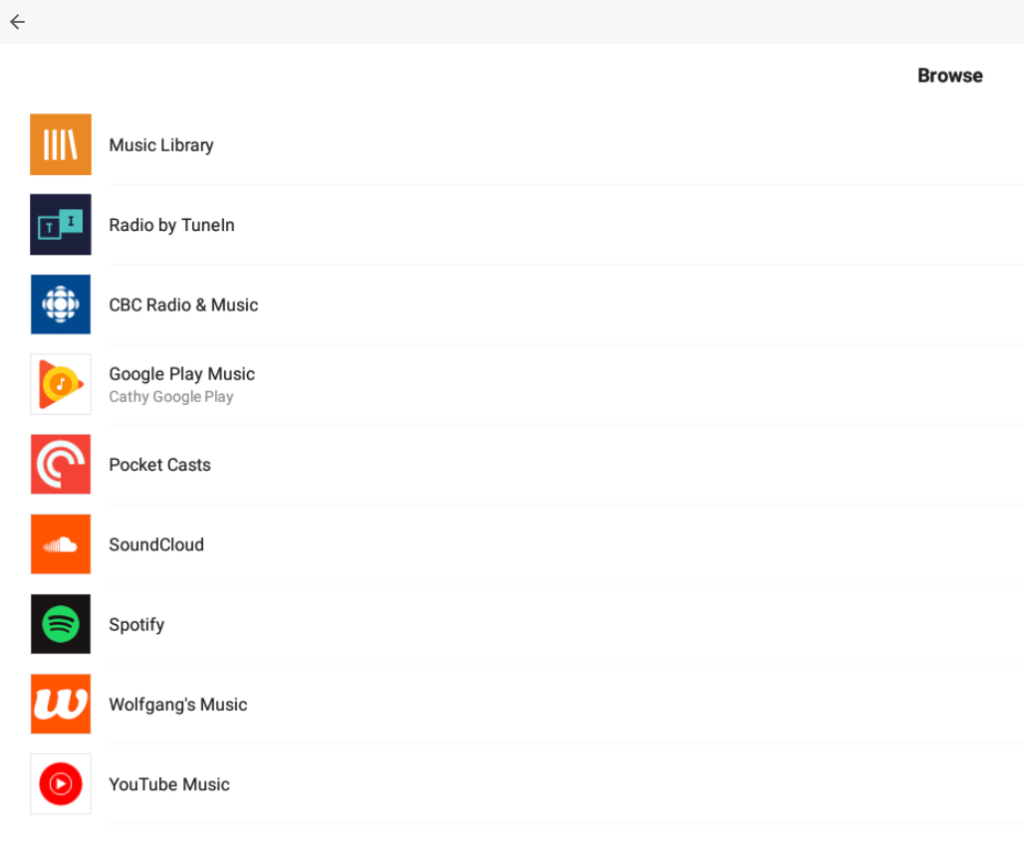
What I want, I’ve lamented for some time, is a Sonos for TV shows. Sonos is a wireless speaker system that, apart from allowing you control speakers in various rooms in the house, consolidates most anything you want to listen to in one place. Your own digital music library. Spotify. Google Music. YouTube Music. Podcast apps. Audible audiobooks. Apple music. Radio stations. Where applicable, the subscriptions are up to you to set up, but once have, you can search through it all, you create playlists that mix and match among them—you can have all your “sound” stuff organized in one place. (At least when you’re home.)
Sonos menu of sound options
Rogers Ignite is kind of like that for TV. By “Rogers”, I do mean, yes, the big cable company. Ignite TV is their IPTV (TV over the Internet) offering. Initially available only with expensive, premium packages, they now have cheaper tiers on offer, and we switched to it this summer.
Of course you get the cable channels you subscribe to, which in our case isn’t a lot (just the $25 “starter package”). But we were also offered Crave + HBO free for six months, which we of course accepted. At regular price, Crave + HBO from Rogers cost the same as if you subscribed to them directly, but then you can access them from TV same as any other channel, including on-demand. (You should also have access to them through the Crave app with your Rogers login, but there is some bug there preventing that from working—Crave can’t seem to recognize that you really do have a Rogers cable subscription.)
If you have a Netflix subscription, you can access that through your Ignite box as well. Also, YouTube. And apparently coming soon: Amazon Prime.
The Ignite box itself is this tiny little thing, compared with the large, power-hungry PVRs of the past. You get a ton of cloud storage with it, so you can record shows to your heart’s content. And it’s much smarter about recording those: if the same show plays three times in a week, it’s only going to record it once for you.
The Ignite TV box is smaller than a Blu-ray case
The basic Ignite package comes with only one box; you can add others for $5/month each. We have two. All the same information (recordings, viewing history) is available on both. If wanting to move one to a different TV in the house, temporarily or permanently, that’s quite easy to do.
There’s also a lovely, seamless integration with anything available on demand. Previously I almost never looked at Rogers On Demand stuff; it was off in its own universe, on those special, hard-to-navigate channels. I often forgot it was even there. Now you can find and watch that on-demand content as easily as anything you’ve recorded.
To find things, as their ads point out, you can just talk to the remote. Wherever it is—on demand, available to record, online—it will show you and give you watch options. It remembers what you’ve already watched and makes logical assumptions based on that. It’s all pretty slick.
Oh, and you can also watch on your phone, tablet, or PC, through the Ignite TV app—live TV, recordings, and on demand content. In many cases, you can download your recordings for off-line viewing. One thing not available? Chromecast, as I guess that would kind be competition. But since your Chromecast is typically on your TV, and you can already watch all the stuff on your TV, I don’t see that as a huge issue. (Just if wanting to watch on someone else’s Chromecast while away, I guess.)
Ignite TV app
So that does bring much TV content together, saving mental energy, though not money. I have no idea what we do about the ballooning cost. For now, I’ll just try to resist the pending Disney service and YouTube Premium.




 Cultureguru's Weblog