Living life online

A poll that got some play last week said that Canadian smart phone owners spend about 86% of their free time looking at a screen.

I’m sure my numbers are ranging up around there as well. And that sounds terrible, as though I’m frittering my life away as a couch potato, playing violent games, reading Facebook posts, and watching mindless television.

When really, for me, I believe it’s not so much a change of activity as just a change of medium. I used to read books, magazines, and newspaper exclusively on paper. Now, more and more, I read them on screens. But regardless, it’s still a good activity for my brain.

And, I used to write letters with pen and paper. Now I communicate via some kind of screen, mostly. Which is a relief to my recipients, as my handwriting is terrible. (And sometimes, I will still print the results on paper and mail them out, just to be retro.) Nevertheless, I’m still keeping up social ties.

What about exercise? It’s not new that I do that in front of screens. First with VHS, now with DVDs, and I imagine I’ll move on to streaming options in the future, but regardless, I’m a long-time fan of following along with video workouts. And my collection of music DVDs are a big help in getting through treadmill and free weight workouts. Inside or out, with screens or nature, it’s still good for the body.

Thanks to digital sheet music, I even use screens when making music. I now have this Bluetooth foot pedal so I can change pages without lifting hand from keyboard. It’s very cool.

[And the article has “listening to radio” as a non-digital activity. Who in the world ever just sits and listens to the radio, without also doing something else at the same time—driving, cooking, brushing your teeth, paying your bills? And aren’t most radio stations accessible online? To list “listening to radio” as an activity in itself is just peculiar.]

But all that defensiveness aside… I do believe it’s good to get out into the real world and interact with it directly, sans screens. And, I’ll admit, I sometimes I suspect my balance there is off.

A real symptom of this is my, frankly, incredibly low usage of my smart phone. Per the poll, average smart phone usage is 1.5 hours a day. Here I am way below average, at maybe 3 minutes per day?

Because basically, most of what I can do on a phone I can also do on a tablet or computer. And given a choice, I’d rather use those, because the screens are bigger. The phone’s advantage is great portability + not requiring an Internet connection. So it’s fantastic when you’re out and about; often it’s the the only option there.

I’m having to conclude I’m just not “out and about” that much.

(On the plus side, my cell phone bill is only $30 a month, including data! For those not from Canada: That’s pretty good.)

Nevertheless, I did recently upgrade my cell phone. The old one had the world’s tiniest amount of storage, and that was making it incredibly difficult to update the few phone apps I do consider critical: Evernote, Twitter, Swiftkey, Gmail, GPS. Weary of its constant “Out of space” warnings, I paid it off the old and am now the proud owner of an unlocked, 16 GB, Google Nexus 4.

Photo of Google Nexus 4

I am stunned at the speed of this thing, I must say; couldn’t believe how fast everything downs (on the same wifi connection as before). It also has a nice, sharp screen and the very latest version of the Android OS. My older Android tablet seems rather stodgy by comparison.

So given that nice design, I’d actually like to use it more, but that just isn’t going to happen unless I actually get out, away from home and office, more often. Ironic?

Rogers’ Next Issue e-magazine interface is pretty nice (dammit)

Rogers recently launched Next Issue, yet another e-magazine option. The big difference between it and the ones I already use, Zinio and Google Play, is that you pay a monthly fee, and then you can download and read as many of their magazines as you want. That fee is $10 month for access to monthly magazines, $15 to also access weeklies.

Obviously that’s $120 to $180 a year (though yes, you can cancel at any time). As I already subscribe to a number of magazines individually, either on paper or digital, I thought it might be worthwhile if those were included.

Alas, it currently includes only one of my current subscriptions: Wired. So no Walrus, Maisonneuve, Pacific Standard, Bitch (Feminist response to popular culture), Nutrition Action Newsletter, or This Magazine. (The full list of what they do offer is here.) But despite already concluding it wouldn’t be worth the money, I decided to try their free two-month trial (one-month trial if you’re not a Rogers customer).

So I have to grant this: It’s a really nicely designed app. Once you download it and sign in (you can use your Rogers online account, if you have one), you get a list of the all the magazines they carry. You then tap on the ones you think you’ll be most interested in reading. (You can, of course, always change your list.) On future logins, just those magazines appear for selection, initially.

Next issue interface

You then tap on any of those to get a view of available current and past issues (seems to be up to a year’s worth, or so). You “long-press” any issues you want to read and they downloaded, as indicated by a pin icon. In the same way, you can unpin when you’re done.

It’s all very easy—you get text guidance through this process—and admittedly more fun, as you don’t have the checkout process at as the end, as you would with individual purchases in Zinio or the Google Play store.

As for actual reading, that’s pretty nice, too. How nice depends on the publisher. For example:

  • Entertainment Weekly—not available on Zinio or Play—was the best. They scale each page to fit nicely on a 10-inch tablet; no zooming required. When there is more content than can practically fit, you get little scroll up and down icons on the page you can use to see more. They also have links to videos with star interviews and fun things like that.
  • Cooking Light takes a similar “no-zoom, just scroll” approach to presenting pages, with little arrows making it clear that’s what you need to do. They also have easy links to their website with more recipes and food information.
  • Maclean’s is pretty basic, just presenting the pages at actual size, so you have to scroll down to the bottom if you want.
  • Rolling Stone still requires zooming, and doesn’t seem to include any neat interactive stuff.

For navigating through, the app offers a bar at the bottom, and if you click it correctly, you get a interactive mini-view of all the pages of the magazine that you can “flip” through for the one you want. That’s also kind of fun. (Though purely in practical terms, Zinio’s tile view of pages and popup table of contents might actually be easier to select from.)

Next Issue also use on up to five devices, and is supported on Android, iOs, and Windows 8. That’s less useful for my husband, who has a Blackberry tablet and a Windows 7 PC. So we’re not able to practically share an account in this household, until some upgrading happens.

Would also note that Rogers has now removed the magazines it publishes—such as Maclean’s, Chatelaine, and MoneySense—from Zinio (though they still seem to be in Google Play Store, at this point). That’s a bummer because that also removes them from the library version of Zinio, which made them free!

Even with those omissions, Zinio still has the bigger selection of magazines, with some libraries (like mine) making many of them free. It’s also the only one with a bookmark and share feature, both of which can be pretty handy. And it works on Blackberry, and has a desktop version (which I rarely use, but Jean does).

But just on the fun factor, gotta say Next Issue wins. Just not sure it’s worth $120+ more to Rogers from me, just yet.

Another post I found on this, comparing Zinio, Next Issue, and Apple’s Newstand.

First two weeks with Windows 8

It’s been a couple of weeks with the new Windows 8 computer, and while the relationship between us remains a bit tense, at least we aren’t fighting with each other quite as frequently anymore.

Let’s just say I do sympathize with people complaining about Windows 8. Admittedly, day to day, you don’t have to poke around in the bowels of the OS that much, and otherwise it’s not that much different than Windows 7—at least in desktop mode. And it does seem to start more quickly, which is nice.

But when you first setting up a computer, all you’re doing is poking around in the bowels of the OS, and the fact that everything has changed there just makes all those non-fun tasks that much more frustrating. So you do develop this initial, and growing, hatred for Windows 8 as you run through a series of Google searches such as:

  • How do I map a network drive in Windows 8?

  • Where is the Control Panel in Windows 8? (Actually, I didn’t figure that one out! I just installed the Star 8 app to put it back in its Windows 7 place on the new computer!)

  • How do you select which speaker to use in Windows 8?

  • How do you shut down a Windows 8 computer?

Yes, shut down. I mean, seriously. Microsoft put the Shut down command in the Settings menu, three clicks deep. I’ve now realized that my PC manufacturer added a one-click taskbar menu with Shut Down and Restart options. Yay! But they shouldn’t have had to. That’s just terrible UI design for a super-basic, very frequently used feature.

Windows 8 Shut down menu

Put the pointer in the bottom-right corner of the screen to get the side menu displayed, click Settings [and, oh look, there‘s the Control Panel], click Power, and there is Shut down! Nice and inconvenient.

And why the heck doesn’t the ESC key let you out of those “app” windows? That’s exactly what that key is supposed to be for!

Esc = Savior
This cartoon Copyright © 2013 Matthew Inman, The Oatmeal, http://theoatmeal.com. Click the image to get the full comic.

Instead, you have to click the right Windows key to get out. This is not a usability improvement!

Mind you, I do make things tough on myself because—I’ve realized—I don’t seem to like the default settings on anything, which means I have a lot of tweaking to do on new computers—something normal people (with lives?) don’t bother with.

And, I now have things mostly working, except for ongoing troubles with my display settings. They’re pretty much set as want them. I’ve made peace with the opaque title bars. I still think they’re kind of ugly, but I do find myself entertained by the fact they change colors with my desktop background to match it better. I also like that you can display different desktop background images on each monitor.

So my only issue now, really, is that the computer keeps losing these settings. Whenever it goes to sleep, I “awaken” it to find, for example, that the resolution is all out of whack, and all the desktop shortcuts are a weird size—or have all moved on to my big-screen TV! Rebooting usually fixes things, but not always completely. To be fair, I’m not sure if this really a Windows 8 issue, or more of a hardware problem. All I know is, my old computer never did that…

I’m managing, for now, by greatly extending how long the computer waits before going to sleep. Longer term, we have a much better display driver from an older computer that we’ll probably install in this one (because, as mentioned, I’m not a fan of the defaults), to see if that helps.

Requiem for my Windows 7 PC

Sunday night, when I returned to the computer I’d been working on just fine all day, nothing was displaying on either monitor, beyond a brief Analog / Digital message. The usual step of just rebooting produced no better effect, and checking all the plugs found nothing loose, nothing amiss.

The next morning, the computer didn’t entirely seem to even be booting anymore (though it’s quite hard to tell what’s going on, with no display).

It was actually the first time a computer had just up and died on me. Of course, I was not pleased. But really, thank goodness it happened in 2013 and not in, say, 2003. Or 1993.

Was a time when losing a PC meant potentially losing an awful lot of data, stored on that hard local drive, not necessarily all backed up.

Now, we store pretty much all the files we care about—songs, documents, spreadsheets, photos, videos, sheet music–on a network drive, with backup . And  like everyone else, we’ve moved to keeping some stuff “in the cloud”–email, agenda, blog posts, Evernote lists that organize my life—making them accessible on any tablet, smart phone, or computer. I may not have a computer right now, but I still have basically all my content.

So, this is really more of a bother than a trauma. Despite the above, there are a few things on the old hard drive that I’d like to retrieve if I can, so we’re going to bring the old computer in to get the hard drive taken out and stored into an USB-connected external drive case, which I’ll be able to attach to a new computer.

Did you catch that? Despite this being just a bother (for heaven’s, we have another computer! And two tablets!), I have already ordered a new computer.

I guess the greater speed and power will be nice. Just too bad it’s Windows 8. I swear, the biggest issue these days in having to upgrade hardware, is in then having to relearn software.

I know Windows 8 has its fans. The problem is, Windows 7 is hardly leaving my life. All day, every day, of my work life, I am on a Windows 7 computer, and that won’t be changing soon. And our other computer? Also Windows 7. So it’s not as if I can really move on and switch over to the Windows 8 way of doing things. I fear being in permanent, irritated “learner” mode on my own PC.

Windows 7 desktops are still available, by the way. (Yes, desktop, not laptop. I don’t see the point of a laptop when I have a tablet.) Jean kindly (or, more likely, fearing he’d otherwise have to go back to sharing a computer with me) did the online research and found one decent Windows 7 option, and one Windows 8. I was trying to decide which to get–the Windows 8 one was more powerful, but the Windows 7 one was Windows 7!–when I thought to dig into the question of HDMI ports. The Windows 7 PC didn’t come with one.

“That’s it, then,” I said. “Because HDMI is an absolute necessity!”

And then we both looked at each other laughed at my having put high-definition signals on the same level of importance as food, shelter, and oxygen.

But I still bought the Windows 8 one. Because I do really love being able to connect the PC to the big-screen TV and watching online video super-sized, with great sound, from the comfort of my couch.

And I have found an article called How to make Windows 8 look and feel like Windows 7 , which I’m hoping will be of some help in the transition. And at least iTunes 10 is still available, so I can avoid the transition to iTunes 11 (shudder) a little longer.

Non-virtual spam (and I don’t mean the lunch meat)

It was an unusual enough in itself that my mailbox—and by that I mean my non-virtual mailbox, the one that Canada Post delivers items to—apparently contained no junk mail this day. No flyers, nothing unaddressed. Just real mail! It seemed. Airs of bygones days, when mail was still mostly nice to receive. I got:

  • A real-life thank you card, with hand-written note.
  • The latest issue of a paper magazine that I subscribe to
  • A rental DVD! (From zip.ca, still in business, though I don’t know how long.)

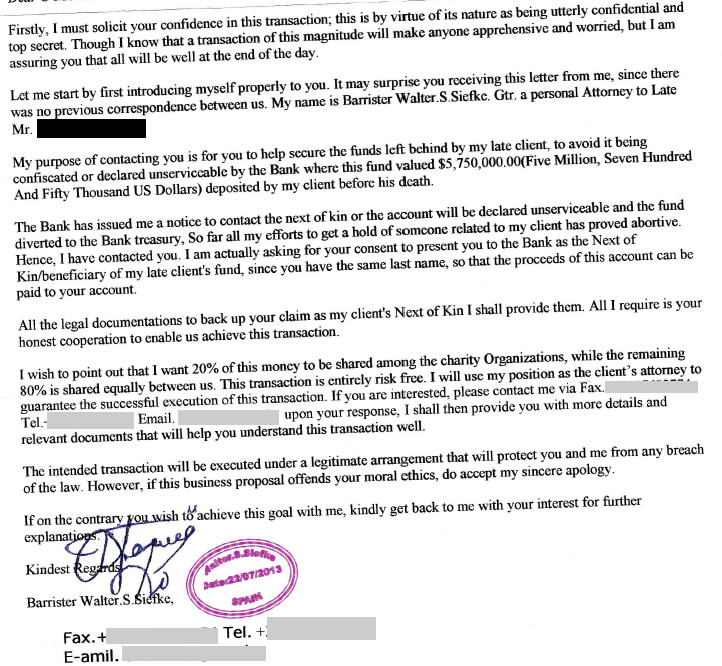
The final item was a bit of a puzzle. An international letter, addressed to me. I was most curious about this one.

This was the opening paragraph.

Firstly, I must solicit your confidence in this transaction; this is by virtue of its nature as being utterly confidential and top secret. Though I know that a transaction of this magnitude will make anyone apprehensive and worried, but I am assuring you that all will be well at the end of the day.

Utterly confidential and top secret! Both! With assurances that all would be well, “at the end of the day”. I was mesmerized.

Somebody in Spain had composed a full, legal-ish sounding letter, largely correctly spelled, outlining an inheritance scheme. But instead of just emailing it more or less for free to every virtual address they could get their hands on, they printed it on paper, folded it and put it in an envelope, added international postage (a stamp celebrating Unesco), and put in a real mailbox.

Is this sort of brilliant, or especially moronic? Either way, I must appreciate the effort. At least this person is working for their ill-gotten gain.

letter

All he requires is my honest cooperation, if it doesn’t offend my moral ethics. This transaction is entirely risk free. 🙂


Want a free Zinio subscription?

I can’t give you such a thing, but if you’re interested, head on over to The Wandering Gourmet—an interesting blog anyway, for those into travel and food—and leave a comment on this post saying what you might like to subscribe to. That’s all there is to it. (But hurry; only a few left.)

Zinio, you may recall, offers a wide assortment eMagazines that you can read that you can read on any tablet or PC (or smart phone, I guess, though I personally would not try reading a magazine on that small a screen). I am quite fond of their service.

Don’t worry; you’re in the right place

Just trying out a new theme for this blog. I was tired of the narrow column limiting the width of image I could use.

This one should be more readable on a variety of devices. May do a bit more tweaking in the coming weeks (not sure about that header image), but I think it basically work.

Magazines go “e”

I’m a magazine fan. News has its place, books have their place, but in a nice niche in between there lies the magazine: Current but not daily, engrossing but readable in a couple hours, and often possessing a more beautiful design than either of the other two.

I find out things from magazines that just don’t hear about anywhere else. Did you know that the tiny town of Montague in PEI is currently hosting thousands of new Buddhist monks (as residents)? If you read the latest Maisonneuve magazine, you would. Or from Utne Reader, the benefits of a zero-growth economy based on negative-interest dollars, which actually have existed in history. And, OK, I did know that Windows 8 was unpopular, but had never heard that analyzed as being because its tablet / PC design made it “the mullet of operating systems”, as Wired did.

Magazines

Maisonneuve, I subscribe to on paper, along with The Walrus, Nutrition Action Newsletter, and Bitch: Feminist Response to Pop Culture. Utne Reader, Wired, and several others, though, I read electronically, on my tablet.

To do so, I use one of two apps: Zinio or Google Play Magazines. Both give you pretty much the same layout as you’d get on paper, only in scrollable, zoom-able form. The apps are free, but the magazines themselves, in most cases, are not. [Although more on that later…]

Zinio, Digital MagazinesZinio’s been around longer and has a bigger catalog, including a lot of back issues, which can be nice sometimes. Subscriptions are almost always a better deal than single issues, but single issues can be a relative bargain compared to paper, particularly with foreign magazine. Uncut  (which is British) is around $15 on the newsstand, and about $5 at Zinio. For magazines that don’t have to travel so far, though, savings are usually a lot more modest. (And some major magazines, it should be noted, are only available for Apple iPads.)

Update to below paragraph: This week, Zinio on Android offered an update that solves the zoom problem! I can now change pages while zoomed. I have to say, given their other features, this now gives them the overall technical advantage over Google Play. Stay tuned..

[ The main advantage I’ve found with the Google Play magazines is that I can swipe to the next page while pages are zoomed. With Zinio, I have to scrunch the page back to “normal” size before I can swipe. Given that I have to zoom pretty much every page (anything less than a 10″ tablet, I think, wouldn’t really work at all for magazines), the Google Play ones are a time-saver. Google Play does lack some of the features of Zinio that are on occasion useful, however, such as the ability to bookmark pages, and to print (with watermark) them or send them to email, EverNote, DropBox, or whatever. ]

Neither, it seems to me, really takes advantage of the possibilities offered by being on a web-enabled medium, such as embedding video or streaming music. (The paper version of Uncut, for example, typically comes with a CD, but in the E version, you just don’t get the songs.) Only the text links are enabled. On the other hand, you aren’t web-dependent. Once downloaded, you can read the magazine while your device is offline.

Recently, Waterloo Public Library (WPL) announced the availability of Zinio magazines through them. I tried it out last weekend. It requires three logins: The expected one with your library card number (which I already had), a new one that grants access to the WPL catalog of magazines in particular, then a Zinio account (which I already had).

Once in, though, it’s quite a large catalog of magazines they have. And, unlike eBooks, which stop working on your device after the loan period of 1 to 3 weeks, the selected magazines don’t appear to have expiry dates. Guess I’ll know for sure in a couple weeks, but the library advertises “no holds and no returns!” So I’m not sure I get the business model here, on behalf of Zinio or the magazine publishers.

But let’s just say, to me, it’s well worth the triple login. Happy reading!

Songza: Playlists by music experts

Songza is yet another streaming Internet radio station. I’ve been trying it out, and quickly discovered it had two advantages over Last.fm:

  • It’s free (not just for the first month).
  • Its app works on cell phones and tablets. Even in Canada. (Course, with the cost of Canadian data plans, one can hardly afford to use it too much, but that’s not Songza’s fault.)

What it doesn’t have, of course, is Last.fm’s “scrobbler” history of what you’ve listened to in the past. But it’s pretty intelligent at getting you started. Right now, for example, it points out that it’s Sunday night, and so you might be looking for music for:

  • Studying
  • Unwinding
  • Bedtime (is that for seniors? It’s 9 pm!)
  • St Patrick’s Day

But if you don’t want to be so led by the nose, you can click into Popular or All Categories to uncover a dizzying range of possibilities.

One thing that does annoy me somewhat is that having picked something, you then have to make more choices, and more choices. Like, OK, you decide Unwinding is what you want. Next choice is:

  • Easy Listening Pop
  • Haunting and Beautiful
  • Golden Oldies
  • Classic Rock Nights
  • Sophisticated Art Pop

And if you are then intrigued by Haunting and Beautiful, well, then, you have another choice to make, among three hauntingly beautiful playlists. (It’s this third one that really makes me sigh.)

But, creating an account, and doing a little rating of what comes up in the playlists helps it make suggestions. For example, after logging in, the “Studying” option went away for me, in favour of “Love and Romance”. Ooh la la. And the original Unwinding options included different genres: bye-bye Mellow Country, hello Classic Rock Nights.

The point of using this is music discovering, or re-discovery, so it’s bound to be somewhat hit and miss, especially at first. (If you rate a song with a thumb’s down, Songza will immediately move along to the next.) When Songza does manage to give you something exactly in tune with your current mood, though, it’s kind of magical. It can just make your whole day.

A few treasures unearthed via Internet radio :

Joe Jackson – One More Time
Squeeze – Separate Beds
The Smithereens – Only a Memory
Tori Amos – Wednesday
The Spin Doctors – Two Princes
Gin Blossoms – Follow You Down
Lady Gaga – Eh, Eh
Sophie B Hawkins – Damn, Wish I Was Your Lover
Sade – Smooth Operator
Fun – Some nights
Imagine Dragon – Radioactive
Happy listening.

Scrobbling Last.fm

Pandora radio is this website / app that is, apparently, amazingly good at finding new music you will like, based on algorithmic analysis of music you already like. However, it’s never been legally available to Canadians.

Nevertheless, I have found my way through to it a few times. But I’ve never had the patience to stick with it long enough to see its amazing-ness in action. Because, of course, you have to “seed” it with information about your current tastes. This requires you rating songs it throws at you, or trying out shortcuts like naming a band you like.

I don’t have the patience to stick with the ratings thing for too long, and naming, for example, The Who, as band I like, results in a fairly unsophisticated playlist of bands like The Rolling Stones, Cream, and Jimi Hendrix, none of whom I’m that bowled over by. (So whatever it is I love about The Who, it’s not whatever musical commonality they have with those bands.)

But, then rediscovered Last.fm. Legally available to Canadians—albeit not on our smart phones!

I had actually signed up for a free trial with Last.fm a little over a year ago, but didn’t end up motivated enough at the time to switch to pay mode. However, I did allow them to continue to “scrobble” on my computer, even though I didn’t quite know what that meant. I just knew that after running iTunes to sync my iPod, it would ask if it could “scrobble” certain tracks, and I’d say sure, and it would apparently do that.

But I checked them out again recently and discovered that it has been essentially building up a profile of my musical tastes. It has lists of the artists and songs I’ve listened to most in the past year, 6 months, 3 months, or ever… Most of which are not a surprise, although the vagaries of the iPod shuffle do result in some weirdness, such as the fact I that I apparently listened to Abba’s “Thank You for the Music” more than any other song last year! (Geez, it’s not even my favorite Abba song…)

Abba
Abba, of whose music I am apparently very grateful

And then, if you pay Last.fm (a big $3 for a month), you get access to various “radio” stations based on your stats. You can use them to just listen to stuff you already own (to which I say, don’t I already have an iPod / iTunes for that?), or to a mix of your songs plus other songs they think you’ll like, or to entirely new music they suggest.

You can also build stations based on theme (like 80s music, classic rock, or dance), or other artists, which will also take into account your listening history.

I don’t believe Last.fm has the sophisticated algorithm that Pandora does. So, results are a bit uneven. For example sometimes my mix has just too frequent repetitions of weak-link offerings such Keith Moon solo songs or Queen without Freddie Mercury, or gets too heavily weighted toward female singers (maybe that’s the Abba effect?), leaving me with a testosterone craving.

Bjork
A girl can only take so much Bjork…
Roger Daltrey
… before she needs a little Daltrey

Although The Who playlist (sigh) has too much Cream, Jimi Hendrix, and Rolling Stones.

Fortunately, though, you can always switch to another “station” if the current one is letting you down. I had great luck with “The Police” radio, for example, which seemed to result in playlist of all the 80s music that didn’t suck! And that magically seemed to improve my “Mix” when I went back to it after.

All in all, Last.fm is helping me find new (or old) music that I like, or had forgotten I like, even though I though I do have to skip forward through some tracks on the way. (I now know, for example, that Elvis Costello did a quite decent version of Christina Aguilera’s “Beautiful”) For the impatient Canadian, it’s not a bad option.